Most ChatGPT resume prompts fail because they're too vague. Typing "make my resume better" produces the same generic language that every recruiter has seen. The prompts on this blog are specific, structured and designed to produce output you can actually use.
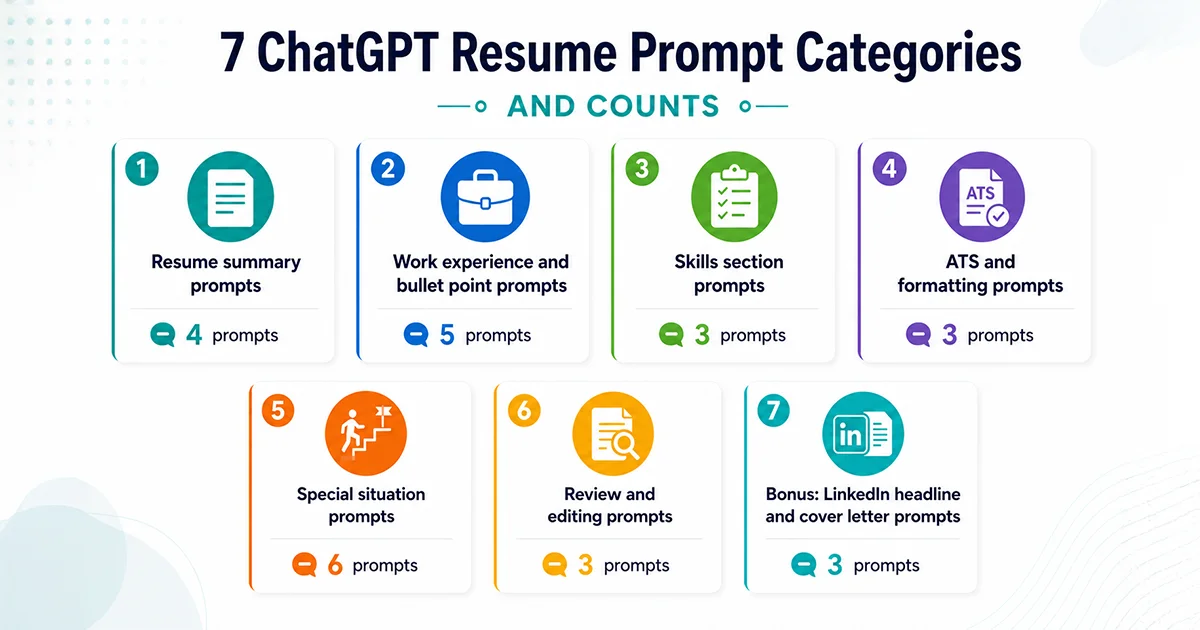
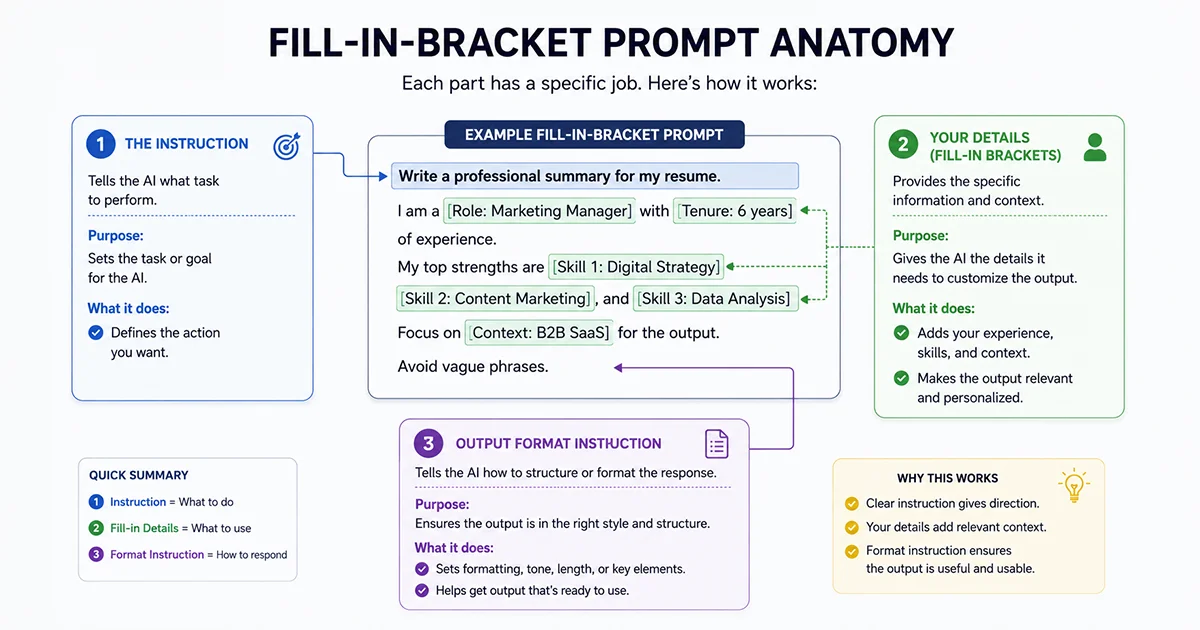
We have organized 25+ prompts into seven categories, ranging from writing a summary from scratch to handling tricky situations like employment gaps or career changes. Each prompt uses fill-in brackets so you can drop in your details and copy the text directly into ChatGPT.
Before you start, gather four things: your current resume, the job description you're targeting, 3-5 quantified achievements, and your target job title.
At A Glance: ChatGPT Resume Prompts
25+ copy-paste ChatGPT prompts, organized by what you are trying to fix -- from writing a summary to handling employment gaps and career changes.
What's on this page: 25+ prompts across 7 categories, each with fill-in brackets ready to paste into ChatGPT.
Before you start: Have your resume, the job description, and at least 2-3 quantified achievements ready. Better inputs produce better output.
Categories covered: Resume summary, work experience bullets, skills section, ATS optimization, special situations (career change, gaps, layoffs, military), review and editing, plus LinkedIn and cover letter bonus prompts.
Special situations: Dedicated prompts for career changers, employment gaps, layoffs, short tenures, executive roles, and military-to-civilian transitions.
After using these prompts: Check your revised resume passes ATS with our Resume Optimizer before applying.
📝 Ready to apply? Run your revised resume through our Resume Optimizer to confirm it passes ATS screening for your target role.
Before you start: what to have ready
The quality of ChatGPT's output depends almost entirely on what you give it. A prompt with specific inputs produces results a hiring manager will notice. A prompt with vague inputs produces output that sounds like every other AI-assisted resume.
Gather these four items before using any prompt on this page:
Your current resume: Have your existing document or a bullet-point summary of your job history ready to copy.
The full job description: Copy the exact text for the target role you want to land.
Three quantified achievements: Look for specific percentages, dollar amounts, team sizes or timeframes from your career.
Your target job title: Know the exact position name you are actively pursuing.
If you don't have exact metrics yet, that's fine. Several prompts below are specifically designed to help you surface or estimate them.
✅ For a deeper guide on the ChatGPT resume writing process, check out ourChatGPT for Resume Writing companion guide.
Resume summary prompts
The summary is the first thing a recruiter reads and the most commonly wasted section. Vague phrases like "results-oriented professional" communicate nothing. These prompts produce summaries that are specific, role-aligned, and scannable in under 10 seconds.
Each prompt below is written for a different starting point: writing from scratch, tailoring an existing summary to a job description, handling no experience or explaining an employment gap.
Professional summary from scratch
Use this when: You are writing a new summary and have no existing version to work from.
Write a 3-4 sentence professional summary for my resume. I am a [job title] with [X years] of experience in [industry/field]. My top strengths are [skill 1], [skill 2], and [skill 3]. I am applying for [target role] positions. Focus on measurable impact and career direction. Avoid phrases like "results-driven," "hard-working," or "team player."
Summary tailored to a job description
Use this when: You have an existing summary but want to align it with a specific job posting.
Here is the job description I am applying for:

[Paste full job description]

Here is my current resume summary:

[Paste your current summary]

Rewrite my summary so it mirrors the language and priorities of this job posting. Keep it under 4 sentences. Where possible, use the same terminology the job description uses for skills and qualifications.
Entry-level or new graduate summary
Use this when: You have limited professional experience and need to build a summary around education, internships and projects.
Write a professional summary for a recent [degree] graduate from [university] with a major in [field]. I completed [internship/project/relevant experience]. I also have [additional experience: volunteer work, leadership roles, relevant coursework]. I am targeting entry-level [target role] positions. Frame transferable skills and learning ability as my main selling points, not years of experience.
Employment gap summary
Use this when: You have a gap in your work history and want to address it confidently without leading with it.
Write a professional summary for my resume that does not draw attention to a [X-month/year] career gap between [year] and [year]. During that time I [brief reason: was caregiving, had health issues, was pursuing education, or was relocating]. Before the gap I worked as a [role] in [industry]. I am now targeting [target role] positions. Frame the summary around my skills and what I bring to the role, not the gap itself.
Work experience and bullet point prompts
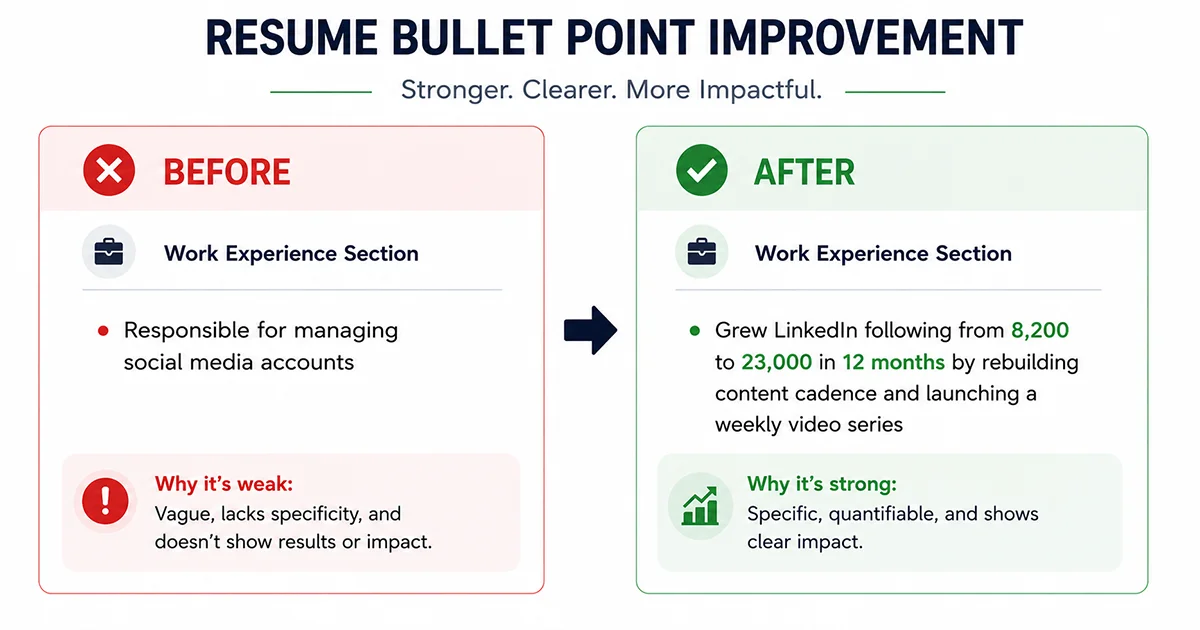
Experience bullet points are where most resumes lose hiring managers. Listing responsibilities ("managed social media accounts") simply tells the recruiter what your job description was. Listing achievements ("grew LinkedIn following 181% in 12 months by rebuilding content cadence") tells them what you actually accomplished. The prompts below help close that gap.
These prompts cover the four situations where bullets most often fall flat: duties listed instead of outcomes, missing metrics, mismatches with the job description and a resume that runs too long.
Before/after example:
Before: "Responsible for managing social media accounts for the company."
After: "Grew LinkedIn following from 8,200 to 23,000 in 12 months by rebuilding the content calendar and launching a weekly video series, driving a 40% increase in inbound leads."
Use this when: Your bullet points describe what you did rather than what resulted from it.
Here are my bullet points for [job title] at [company]:

[Paste 4-6 bullet points]

Rewrite each one as an achievement using this format: [Action verb] + [what you did] + [measurable result]. If I have not given you a specific metric, suggest a realistic placeholder (percentage, dollar amount, time saved, or scale) and note what I should look up to replace it with my actual number.
Quantify vague accomplishments
Use this when: You know you did good work but have not translated it into numbers.
Here are accomplishments from my resume that lack specific numbers:

[Paste 4-6 vague bullet points]

For each bullet, (1) rewrite it with a plausible quantified result, and (2) add a note on what data or records I could check to confirm or replace that number. Mark any metric you invented with [PLACEHOLDER].
Tailor bullet points to a job description
Use this when: You are applying to a specific role and want your most relevant experience to lead.
Here is the job description I am applying for:

[Paste job description]

Here are my current experience bullets for [job title] at [company]:

[Paste your bullet points.]

Rewrite these bullets to emphasize the skills and experiences most relevant to this job posting. Reorder them so the highest-match bullets come first. Keep all facts accurate. Adjust emphasis and language, not substance.
Condense the resume to one page
Use this when: Your resume is running to two pages and you need to cut without losing impact.
Here is my full resume:

[Paste full resume]

I need to fit this on one page without losing my strongest achievements. Suggest what to remove, what to condense, and what to keep at full length. Prioritize cutting by (1) oldest experience, (2) bullets that describe duties rather than outcomes, and (3) redundant skills. Do not cut any bullet that includes a specific metric.
Remove AI-sounding language
Use this when: Your resume uses polished but hollow phrases that a recruiter will recognize as AI-generated.
Here is my resume:

[Paste resume]

Identify every phrase that sounds generic, over-polished, or AI-written (examples: "results-driven," "proven track record," "dynamic professional," "spearheaded," "leveraged synergies"). Replace each one with specific, concrete language that reflects what I actually did. If a bullet has no concrete detail to replace a generic phrase, flag it as needing a real example.
“AI-generated resumes often sound like generic job descriptions. They would contain very general action words without tangible or relevant information.”
Imeiniar Chandra, Regional Director (Michael Page Indonesia) | Source
Skills section prompts
A skills section that lists "Microsoft Office" and "communication" does not help anyone. Recruiters use the skills section to verify keyword matches with the job description, and automated applicant tracking systems scan it directly.
These three prompts help you build a skills section that passes ATS screening and actually reflects what you bring to the specific role you want.
Extract required skills from a job description
Use this when: You want to know exactly which skills a job description is signaling before you write or update your skills section.
Analyze this job description and extract every skill mentioned, both explicit and implied:

[Paste full job description]

Organize the skills into three categories: Technical Skills, Soft Skills, and Tools/Platforms. Then rank each skill by how prominently it appears (high, medium, or low). I will use this to build and prioritize my skills section.
Match your skills to a specific role
Use this when: You have a long skills list and want to trim it to the most relevant for a particular application.
Here are all my skills:

[List all your skills]

Here is the job description I am targeting:

[Paste job description]

Create a skills section that includes only the skills I have that directly match this role. Group them into 2-3 logical categories. Order them by relevance to the posting, most relevant first. Exclude skills that have no clear connection to this specific role.
Identify skill gaps and how to close them
Use this when: You want to understand what you are missing for your target role and what you can realistically do about it before applying.
Here is a job description for a role I want:

[Paste job description]

Here are my current skills:

[List your skills]

Identify the gaps between what this role requires and what I have. For each gap, suggest one specific action I can take in the next 30 days to credibly add this skill to my resume (online course, certification, a small project, or volunteer work). Mark any skill I could list as "in progress" if I start now.
ATS and formatting prompts
Applicant tracking systems filter resumes before a recruiter ever reads them. Common reasons candidates get screened out include missing keywords, non-standard formatting like tables or headers in text boxes, unusual section names and submitting a PDF when the system expects a .docx file. These prompts address each issue directly.
ATS keyword audit
Use this when: You want to compare your resume against a job description to find missing keywords.
Compare my resume to this job description and identify any keywords or phrases the job uses that I am not using in my resume. Do not suggest adding skills I do not have. Only flag terms that describe experience I have but am using different wording for.

Job description:
[Paste job description]
My resume:
[Paste resume]
ATS formatting check
Use this when: You want to verify that your resume's formatting will parse correctly in an ATS.
Review my resume for formatting elements that may cause ATS parsing errors. Look for: tables, text boxes, headers or footers with key information, graphics or images containing text, nonstandard section headings, and unusual fonts or symbols. Flag each issue and explain how to fix it for ATS compatibility.

My resume:
[Paste resume]
Full ATS-pass audit against a specific role
Use this when: You want a complete pre-submission check on how your resume will score against a specific job description.
You are an ATS system evaluating my resume against this job description. Score my resume on: (1) keyword match (which required terms are present and which are missing), (2) formatting (will this parse cleanly), and (3) relevance (does the experience map to what the role needs). Give me a summary rating for each and a list of specific fixes to make before submitting.

Job description:
[Paste job description]
My resume:
[Paste resume]
Special situation prompts
Not every resume situation fits the standard playbook. Career changers, people returning after a gap, military veterans and candidates with short-tenure roles all face unique challenges that a generic resume prompt won’t solve. This section covers six common situations with prompts built for each specific path.
Career change resume
Use this when: You are applying in a different field from your current or most recent job.
I am transitioning from [current role/industry] to [target role/industry]. Here is my current resume:
[Paste resume or key bullet points]

Rewrite my experience section to emphasize transferable skills relevant to [target industry/role]. Replace industry-specific jargon from [current industry] with terminology used in [target industry]. Highlight any accomplishments that demonstrate skills the new field values. Keep all facts accurate.
Employment gap explanation (resume only)
Use this when: You have a gap on your resume and want to present it in a way that does not invite speculation.
My resume has a [X-month/year] gap between [end date of last role] and [current date or next role start]. During this time I [brief reason: caregiving, health, education, relocation, or personal]. Write 1-2 resume-appropriate ways to represent this period that are honest but keep the focus on skills and readiness to work, not the reason for the gap. Do not add anything that is not true.
Layoff or redundancy rewrite
Use this when: Your most recent role ended due to a layoff and you want to present your departure without drawing attention to it.
I was laid off from [company] as a [job title] in [month/year] due to [company restructuring / division closure / mass layoff]. My key accomplishments before the layoff were:
[List 3-5 accomplishments]

Write the experience entry for this role in a way that leads with my contributions and results. Do not include the reason for leaving (that belongs in an interview, not on a resume). If there is a short tenure, write bullets that demonstrate impact in the time I was there.
Executive-level resume
Use this when: You are a director, VP, or C-suite leader and standard resume advice does not fit your scope.
Write an experience section for an executive-level resume. I held the role of [title] at [company] from [dates]. I led a team of [size], managed a budget of [amount], and drove these key outcomes: [list 3-4 strategic achievements with scale and impact].

Rewrite my bullet points for a board-level audience. Each point should demonstrate strategic decision-making, financial or organizational scale, and measurable business impact. Avoid task-level detail. Focus on outcomes at the enterprise level.
Short tenure explanation
Use this when: You held a role for less than a year and want to avoid the resume reading as a red flag.
I worked at [company] as a [job title] for [X months]. I left because of [reason: layoff, restructuring, better opportunity, or relocation -- choose one]. During my time there, I accomplished the following:

[List 2-3 accomplishments]
Write 2-3 resume bullet points for this role that lead with impact, not duration. Do not mention why I left. If the tenure was short, frame the bullet points around what I delivered quickly, not how long I was there.
Military-to-civilian resume
Use this when: You are transitioning from military service to a civilian job and need to translate your experience.
I served in the [branch] as a [military rank and title] for [X years]. My responsibilities included:

[List 4-6 duties using the military terminology you are comfortable with]

Translate each responsibility into civilian-friendly language that a hiring manager in [target industry] would understand. Avoid acronyms and military-specific terms. Highlight the transferable skills: leadership, logistics, operations, team coordination, decision-making under pressure, and training. Rewrite as resume bullet points using the format: action verb + what you did + measurable result.
Review and editing prompts
These prompts treat ChatGPT as an editor rather than a writer. You're giving it your draft and asking it to find the problems you're too close to see: weak language, redundant phrasing, inconsistent formatting, and the hollow phrases that make recruiters scroll past.
Full resume proofreading and clarity review
Use this when: You want a comprehensive quality check before submitting.
Proofread this resume for spelling errors, grammatical issues, inconsistent formatting (bullet style, date formats, capitalization), and unclear phrasing. Flag each issue with the line it appears on and the suggested fix. Do not rewrite the content. Only identify and correct errors.

My resume:
[Paste resume]
Weak language audit
Use this when: Your resume is grammatically correct but feels flat or generic.
Review this resume for weak language: passive voice, vague verbs (helped, assisted, worked on), generic descriptors (various, multiple, many), and filler phrases that add length without meaning. For each instance, suggest a stronger alternative. If a bullet point has no specific achievement to back it up, flag it as a bullet that needs a real example or metric.

My resume:
[Paste resume]
Before-submission final check
Use this when: You are ready to apply and want one last pass before hitting send.
You are a senior recruiter reviewing this resume for a [target role] position. Tell me: (1) the top 3 strengths of this resume as submitted, (2) the 2-3 things that would make you hesitate before advancing the candidate, and (3) the single most important change to make before submitting. Be direct and specific.

Job description:
[Paste job description]
My resume:
[Paste resume]
Bonus: LinkedIn headline and cover letter prompts
These three prompts extend the same logic from your resume to the two other pieces of content recruiters see first: your LinkedIn headline and your cover letter opening. They are not a replacement for dedicated guides on these topics, but they cover the cases where a quick, well-prompted ChatGPT result is faster than starting from scratch.
Use this when: Your LinkedIn headline is still your job title and nothing else.
Write 5 LinkedIn headline variations for me. I am a [job title] specializing in [area] with experience in [relevant background]. I am [actively job searching / open to opportunities / building my network in X field]. Each headline should be under 120 characters. Include the following: one that leads with a value proposition, one that is optimized for recruiter keyword search, and one that signals a career transition (if relevant). Mark which works best for active job searching vs. passive networking.
Cover letter from scratch
Use this when: You need a full cover letter for a specific application.
Write a cover letter for the role of [job title] at [company name]. Here is the job description:
[Paste job description]

About me: I am a [your title] with [X years] experience in [field]. My most relevant accomplishments are [achievement 1 with metric] and [achievement 2 with metric]. I am applying because [genuine reason specific to this company or role]. Keep the letter under 300 words. Structure it as a strong opening sentence (not "I am writing to apply for"), 2-3 sentences on why I am a fit with specific evidence, one sentence on what excites me about this company, and a confident closing with a call to action.
Cover letter opening hook (5 options)
Use this when: You have a cover letter but the opening is weak or generic.
I am applying for [job title] at [company]. Write 5 different opening sentences for my cover letter -- each one designed to stop a hiring manager from skimming. Base them on my most impressive relevant achievement ([describe it in one sentence]), something specific I know about this company ([detail]), and the main problem I can help them solve ([brief description]). Do not start any sentence with "I am writing to..." or "With X years of experience..."
ChatGPT is a strong drafting tool, but it cannot tell you whether your revised resume will actually pass ATS screening for a specific job. Our Resume Optimizer does.
ChatGPT helps you write it. Our Resume Optimizer checks if it works.
Open our Resume Optimizer: Navigate to the tool and paste the specific job description you are targeting.
Upload your resume: Submit your ChatGPT-revised resume directly into the platform.
Review your score: Analyze your automated ATS match score and examine the generated list of missing keywords.
Address any remaining gaps: Return to the specific ATS prompts above to fix any highlighted issues, then re-check your score.
This clear loop, using ChatGPT for content generation and the Resume Optimizer for automated validation, catches issues that either tool alone would miss.
If you are building your resume from scratch rather than editing an existing resume, start with our AI Resume Builder. It generates a structured first draft in minutes using your unique job history and target role. You can then bring that clean draft directly into ChatGPT to refine it further with the bullet point or tailoring prompts above.
FAQ: ChatGPT Resume Prompts
What information should I have ready before using these prompts?
Have your current resume (or job history notes), the full job description for your target role, and at least 2–3 quantified achievements ready before you start. The more specific your inputs, the more usable the output. A target job title is also worth having on hand for the summary and tailoring prompts.
Can ChatGPT write my entire resume for me?
ChatGPT can draft a resume, but the output will be generic if you don't provide specific inputs. The best approach is to feed the tool your real accomplishments, metrics and career details, then use it to improve the language, structure and keyword alignment. A resume built entirely from AI without your specifics will read like every other template in the applicant pool.
Will recruiters know I used ChatGPT on my resume?
They'll know if you use it poorly. Recruiters recognize hollow phrases like "results-driven professional," "proven track record" and "passionate about innovation" because these phrases appear whenever someone asks AI to improve a resume without giving it real content to work from. When you feed ChatGPT specific achievements and ask it to sharpen the language around those facts, the output is indistinguishable from professionally written copy.
Should I use a different prompt for every job application?
You should use a different prompt for tailoring, but not for building from scratch. Your professional summary and bullet points should be customized for each application using the tailoring prompts in this guide. Your baseline resume stays consistent because you tailor the emphasis and language, not the underlying facts.
How do I fix ChatGPT's output when it still sounds generic?
ChatGPT defaults to generic language when prompts lack specifics. If the output sounds hollow, revise your prompt to include concrete details like actual job titles, real company names, specific metrics and the exact keywords from the job description. You can also use the review prompts to catch and replace hollow phrases before submitting.
Recommended Articles
Here are some of the recommended articles from our team


.avif)
.webp)

%20Which%20Should%20You%20Use.webp)